Sentience Studio
Sentience Studio is an observability platform for AI agent execution. It provides deep insights into why your agent made decisions, not just what it did.
Studio explains why an agent acted — not just what it did.
What is Sentience Studio?
Sentience Studio is purpose-built for observability of agent execution. Unlike traditional debugging tools, Studio captures the complete execution context: every decision, every action, every screenshot, and every element interaction.
Purpose: Observability for Agent Execution
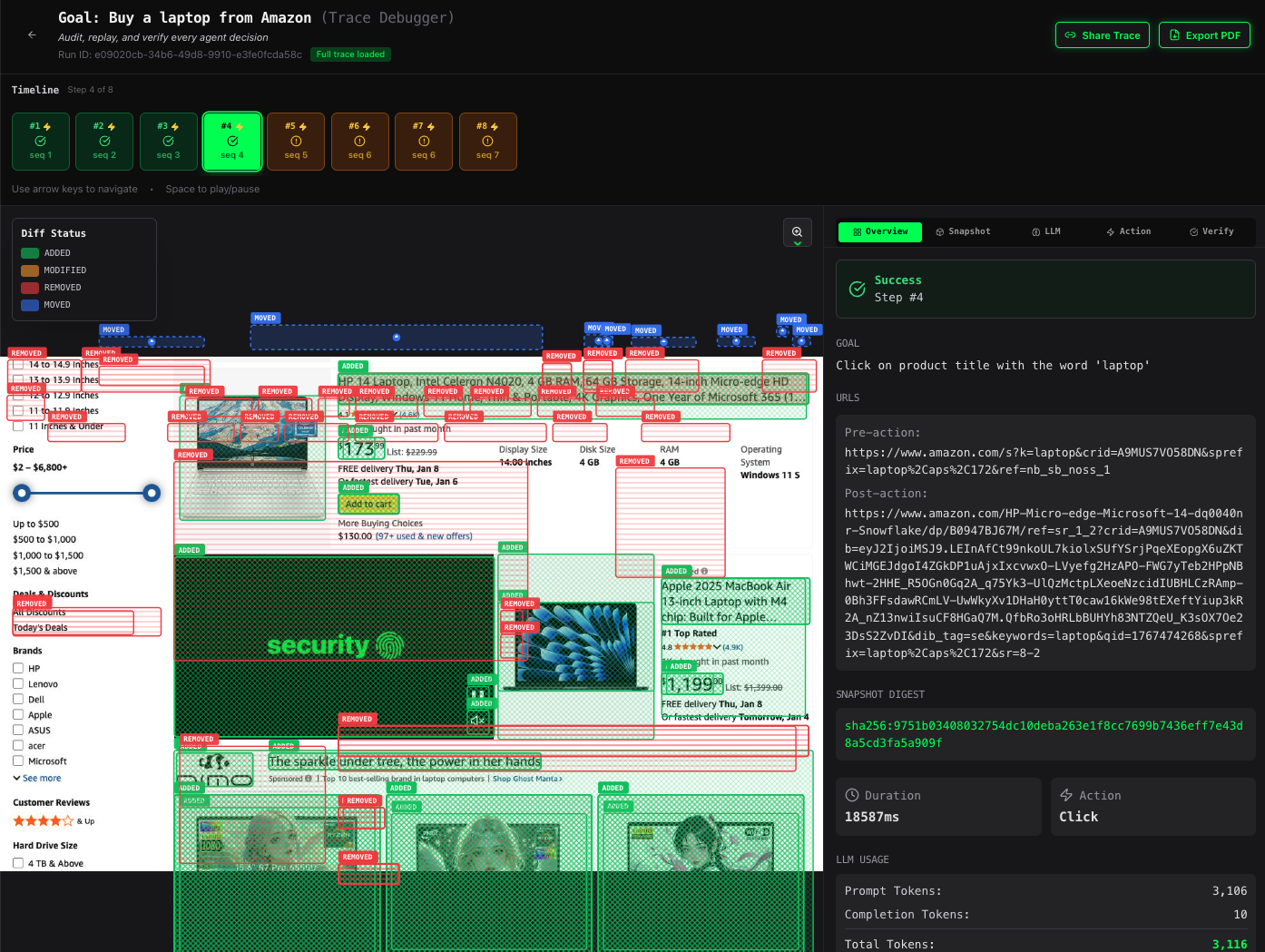
Studio transforms agent debugging from guesswork into systematic analysis. You can:
- Replay any agent run step-by-step
- Inspect the exact state of the page at each decision point
- Understand why the agent chose specific actions
- Debug failures with complete context
- Audit agent behavior for compliance and quality
Problems It Solves
🔍 Debugging
Traditional debugging tools show you code execution, but not the agent's view of the world. Studio shows you:
- The exact page state when the agent made a decision
- Which elements were visible and available
- What the agent "saw" before taking action
- The reasoning behind each step
▶️ Replay
Replay any agent run exactly as it happened:
- Step through execution frame-by-frame
- View screenshots at each step
- See element interactions and bounding boxes
- Understand the sequence of events that led to success or failure
🎯 Determinism
Studio helps you achieve deterministic agent behavior:
- Identify non-deterministic elements (timing, dynamic content)
- Understand why the same input produces different results
- Debug flaky behavior with complete execution traces
- Validate that agents behave consistently
📋 Auditability
Maintain complete records of agent behavior:
- Full execution traces for compliance
- Screenshot evidence of agent actions
- Decision logs for regulatory requirements
- Historical records for analysis and improvement
How It Differs From...
📝 Logs
Logs show you what happened in your code:
INFO: Clicking button at (100, 200)
INFO: Waiting for element to appear
INFO: Element found, proceeding
Studio shows you what the agent saw and why it acted:
- The exact screenshot when the click happened
- All available elements and their importance scores
- The semantic query that found the element
- The reasoning that led to the decision
📸 Screenshots
Screenshots are static images:
- No context about what happened before or after
- No information about element interactions
- No understanding of why the screenshot was taken
Studio provides rich, contextual screenshots:
- Annotated with bounding boxes and element information
- Linked to specific actions and decisions
- Part of a complete execution timeline
- Enhanced with diff overlays and heatmaps
🐛 Traditional Debuggers
Traditional debuggers focus on code execution:
- Breakpoints in your code
- Variable inspection
- Call stack analysis
- Code-level debugging
Studio focuses on agent behavior:
- Visual debugging of agent decisions
- Element-level inspection
- Semantic query analysis
- Action execution context
Standalone App Coming Soon
A free, lightweight Sentience Studio standalone app will be available soon for Windows, Mac, and Linux. Get notified when it's ready.
When Should I Use Studio?
✅ Use Studio For:
Production Agents
Monitor and debug agents running in production:
- Incident Investigation: When a production agent fails, Studio provides complete context for root cause analysis
- Performance Monitoring: Track agent behavior over time to identify regressions
- Quality Assurance: Validate that production agents are making correct decisions
- Customer Support: Use Studio traces to understand and explain agent behavior to users
Flaky Flows
Debug non-deterministic behavior:
- Intermittent Failures: Capture complete execution traces when failures occur
- Timing Issues: Identify race conditions and timing-dependent behavior
- Dynamic Content: Understand how dynamic content affects agent decisions
- Environment Differences: Compare successful and failed runs to identify environmental factors
CI Validation
Integrate Studio into your CI/CD pipeline:
- Automated Testing: Validate agent behavior in CI environments
- Regression Detection: Compare current runs against baseline traces
- Quality Gates: Block deployments if agents fail validation checks
- Test Reporting: Generate detailed reports with screenshots and execution traces
Regressions After Site Changes
Track down issues after website updates:
- Before/After Comparison: Compare traces before and after site changes
- Element Mapping: Identify which elements changed and how
- Impact Analysis: Understand how site changes affect agent behavior
- Quick Fixes: Use Studio insights to rapidly update agent logic
❌ Don't Use Studio For:
Simple One-Off Scripts
For quick, one-time automation tasks:
- Overhead: Studio adds trace collection overhead that's unnecessary for simple scripts
- Storage: Traces consume storage space that may not be needed
- Complexity: Simple scripts don't need the debugging capabilities Studio provides
Alternative: Use basic logging or print statements for simple scripts.
Read-Only Scraping
For pure data extraction without interaction:
- No Actions: If your agent only reads data without clicking or interacting, Studio provides limited value
- Static Content: For scraping static content, traditional logging is sufficient
- Cost: Studio's trace collection has minimal cost, but may be unnecessary for read-only operations
Alternative: Use simple logging or monitoring for read-only scraping tasks.
Getting Started
Ready to start using Studio? Check out:
- SDK Tracing Guide → - Learn how to enable tracing in your agent code
- Getting Started with Studio → - Step-by-step guide to using Studio
- Sign In Sentience Studio → - Explore the Studio interface and features